How to Sell Digital Products and Ebooks Online in Nigeria (2026 Guide)
A practical guide to selling ebooks, templates and other digital downloads in Nigeria: choose a niche, price your product, collect payments, deliver files securely and set up a store with Webift.
The short answer: to sell digital products in Nigeria, pick a specific problem you can solve with a file, such as an ebook, template or guide, create it, price it in naira, set up a store that can collect payment and deliver the file automatically, then promote it where your audience already spends time. With Webift you can upload files up to 500 MB each, collect payment through Paystack, Flutterwave or bank transfer, and send customers a download link by email once their order is confirmed.
Last updated 12 October 2026. Screenshots are from the Webift dashboard. Features and prices were checked on that date and may change.
Have an ebook, guide or digital resource ready? You can create your digital product store with Webift and follow along with the steps below.
What are digital products?
A digital product is something customers receive as a file or an online link instead of a parcel. There is nothing to ship, no stock to count and no delivery fee, which is why digital selling suits creators, freelancers and coaches.
Types of digital products you can sell
- Ebooks and guides: PDF books, workbooks and how-to guides
- Templates: spreadsheets, budget planners, CV or invoice templates, social media templates
- Design assets: logos, fonts, mockups, presets
- Printables: planners, checklists and worksheets
- Audio and music: beats, samples and recordings
- Software and tools: small apps, scripts or plugins
- Course materials: lesson notes, PDFs, video links and resource packs
A note on courses: Webift delivers files and external links. It is not a course platform with a built-in video player or lesson tracking, so for video courses you would typically host the lessons elsewhere and share access links, or sell the course materials as downloads.
Choose a niche people will pay for
The best digital products solve a clear, specific problem for a specific person. Compare these:
- "Business tips" is vague
- "A 30-day content plan for Lagos fashion vendors on Instagram" is specific
Ideas that fit Nigerian audiences include exam preparation notes for university students, a budgeting workbook for salary earners, CAC registration checklists for new founders, recipe collections for home cooks, interview prep packs for graduates and design templates for small businesses.
Test demand before you build: ask your audience what they struggle with, look at the questions people ask in groups you belong to, and offer a small pre-sale or free sample to see who is interested.
Create something valuable
- Make it useful in minutes. A reader should get a quick win early.
- Keep it focused. A tight 30-page guide that solves one problem beats a 200-page document that solves none.
- Design it to look professional: consistent fonts, headings, page numbers and a clear cover.
- Proofread and check links and formulas.
- Version it. Put a version number and date on the file so you can release updates.
Price your digital downloads
Digital products have no shipping cost, but your time, expertise and the value delivered matter. Consider:
- The outcome: what is the result worth to the buyer?
- Your audience's budget: a student template and a business planner can have very different price points
- Payment fees: gateway fees come off each sale, and Paystack's published local fee was 1.5% plus ₦100, capped at ₦2,000, while Flutterwave's was 2% (checked 12 October 2026)
- Bundles: a main product plus a bonus template can raise the order value
As a purely hypothetical example, a ₦3,500 budget planner is easier to test than a ₦25,000 course. Start lower, learn from buyers, then adjust.
Set up a professional storefront
A storefront gives you a branded home for your products instead of a trail of chat messages. In Webift you create a store with your logo, banner and web address, add your products, choose payment methods and publish. For the full walkthrough, see our guide to creating an online store in Nigeria.
Upload your digital files in Webift
In the Products area, start a new product. Webift asks "What are you adding?" and describes the digital option as files customers get after paying, such as ebooks, templates, music or software.
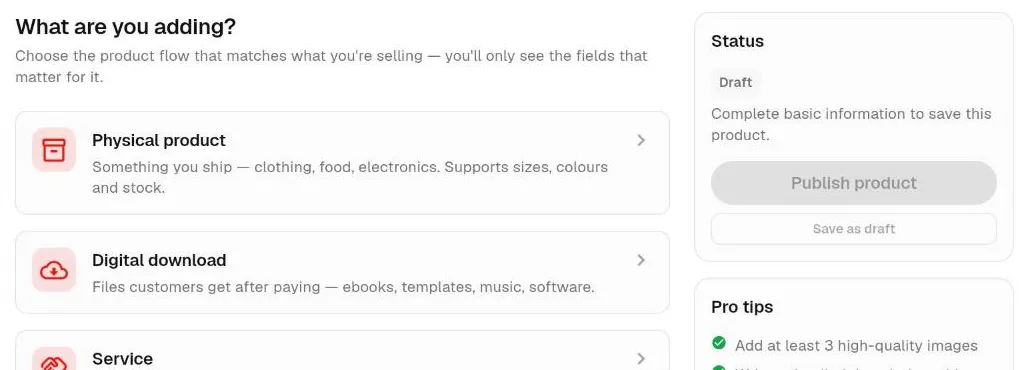
Here is what to know about the digital workflow:
- File types: Webift accepts any file type, with a limit of 500 MB per file. Common choices are PDF, ZIP, DOCX, XLSX, MP3 and MP4.
- Links instead of files: you can also add an external link with a label, for example if your content lives on another platform.
- Required to publish: a digital product needs at least one file or link before it can be published.
- Download limit: you can set an optional limit on how many times each file can be downloaded. If you leave it blank, downloads are unlimited.
- Links do not expire by time: a download link stays valid until the download limit, if any, is reached.
Collect payments
In Settings, open Payment Settings and choose how you want to be paid.
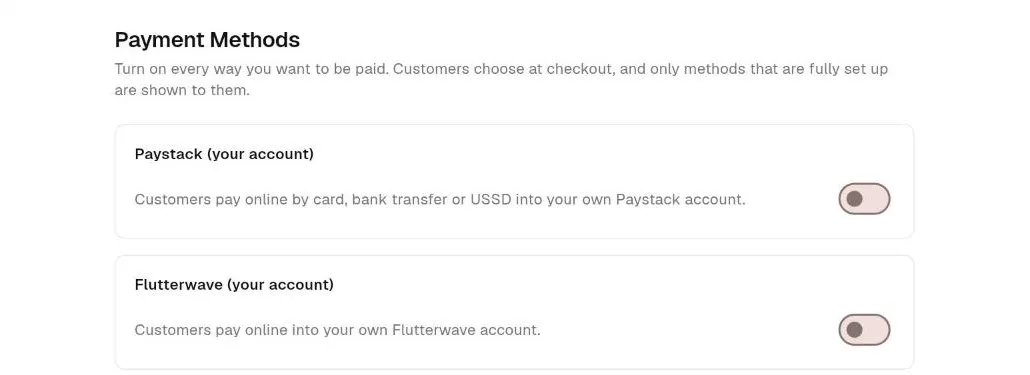
- Paystack or Flutterwave: customers pay online into your own account. For digital-only orders paid this way, Webift confirms the order automatically after payment.
- Bank transfer: customers pay you directly, and you confirm each payment yourself. The download link is sent once you confirm the order.
- Cash on delivery is only offered for physical products, so it will not appear for digital-only carts.
Payment processing depends on each provider's terms, and fees apply. Our guide to accepting online payments in Nigeria covers fees, failed payments and avoiding fake bank alerts.
Delivering purchases securely
After an order is confirmed, Webift emails the customer a download link. The link carries a unique, hard-to-guess code, and customers can also find their downloads in their order page or account. Because access is granted on confirmation, you do not have to send files by hand over chat.
Good habits:
- Use a ZIP file for multi-file products so customers get everything in one download
- Test your own download link before launch
- Tell customers to check their spam folder if the email does not arrive
- Provide a support email or WhatsApp number for download problems
Download limits and access links explained
An access link is the unique address the customer uses to download. A download limit is the number of times a file can be fetched through that link. A limit of, say, five downloads is enough for a customer who changes phones, while still discouraging mass sharing. Setting a limit is your choice, and you can leave it unlimited.
Reducing piracy without unrealistic promises
No system can fully stop a determined person from sharing a file once they have it. You can reduce the problem:
- Set a download limit per file
- Add the buyer's name or order reference to the document, where practical
- State your terms of use clearly: personal use only, no resale
- Offer updates and bonuses to paying customers so buying is more attractive than borrowing
- Keep your price fair so there is less reason to share
- Report copies of your work on platforms that have takedown processes
Market your digital products
- Instagram and TikTok: share short tips from the product, a before-and-after or a page preview
- WhatsApp: post on your status and send the link to people who asked for it, with their permission
- Facebook and LinkedIn groups: answer questions helpfully and mention your guide where rules allow
- A free sample: give away one chapter or template to build trust
- Collaborations: partner with a creator whose audience matches yours
- Email: collect addresses from buyers who agree, and tell them about updates
Our guide to selling products online in Nigeria has more ideas for finding customers.
Design a digital product page that converts
- A clear headline that states the result: "Plan your monthly budget in 30 minutes"
- A cover image that looks professional
- What is inside: pages, formats, sections and bonuses
- Who it is for and not for
- A preview such as a table of contents or sample pages
- Plain delivery details: "You will receive a download link by email after payment."
- Your refund and access policy
- One clear action: a single buy button, not five competing links
Refund and access policies
Because a digital file cannot be returned, many sellers state a clear policy: for example, that the product is non-refundable once downloaded, but that you will help if the file is corrupted, the wrong file was sent or the customer cannot access it. Publish your policy on the product page, and keep it fair and consistent. Check consumer-protection rules that apply to your business.
Selling digital products with Webift
Webift is an ecommerce platform that supports physical products, digital downloads and services in the same store. That is useful if you sell an ebook alongside printed copies, a template with a coaching session, or a physical product with a digital guide.
Webift has a free plan with no subscription price and a Standard plan at ₦5,000 per month, ₦12,000 per quarter, ₦25,000 for six months or ₦50,000 per year (checked 12 October 2026; prices may change). Payment-provider fees are separate. Read the plan details shown at sign-up.
Things to know: Webift is not a course platform, does not expire links by time and cannot guarantee that files will not be shared. It does not have a bulk product import, so you add each product yourself.
A step-by-step Webift example: selling an ebook
Imagine a Lagos finance coach selling a budgeting workbook (the product and price here are hypothetical).
- Create the store. Register, add a logo and write a short description.
- Add the product. Go to Products, choose the digital option, name it "Salary Budget Workbook" and write a clear description.
- Add a cover image and a few preview pages.
- Set the price, say ₦3,500.
- Upload the PDF (and a spreadsheet if you have one), and set a download limit such as five.
- Set up payments. Connect Paystack or Flutterwave so orders confirm automatically, and add bank transfer if you want a manual option.
- Publish the product and the store.
- Test the flow. Buy it yourself with a small amount or use your provider's test mode where available, then check the email and the download.
- Share your link on Instagram, WhatsApp and LinkedIn, and track which posts bring buyers.
Have an ebook, guide or digital resource to sell? Create your digital product store with Webift.
Frequently asked questions
What digital products sell well in Nigeria?
Practical, specific resources do well: study guides, templates, planners, business checklists, recipe books and skills guides. Choose a problem you can solve better than free content.
Can I sell PDF ebooks on Webift?
Yes. Upload the PDF as a digital product, set your price and choose how customers pay. Customers receive a download link by email after the order is confirmed.
What file types and sizes can I upload?
Webift accepts any file type up to 500 MB per file.
How do customers get their files?
By email, once the order is confirmed, and from their order page or account. Orders paid by Paystack or Flutterwave for digital-only carts are confirmed automatically, while bank transfer orders wait for your confirmation.
Can I limit downloads?
Yes. You can set a download limit per file. If you leave it blank, downloads are unlimited.
Can I sell online courses?
You can sell course materials as files or links. Webift does not host video lessons or track progress, so use a separate host for video content.
How do I stop people sharing my files?
You cannot fully prevent it. Use download limits, clear terms, personalised files where practical and fair pricing.
Can I sell templates and music too?
Yes, any digital file type works, within the 500 MB per-file limit.
Final thoughts
Digital products let you sell the same knowledge again and again without stock or shipping. Pick a specific problem, build something useful, price it fairly and make buying and downloading simple. When you are ready, build your digital product store with Webift.