
How to Create an Online Store in Nigeria in 2026 (Step-by-Step Guide)
A practical, step-by-step guide to creating an online store in Nigeria without coding: choose products, set up payments and delivery, test checkout, and share your store on WhatsApp and Instagram.
The short answer: to create an online store in Nigeria you need products with clear photos and prices, a way to get paid, a delivery plan and a platform that ties them together. With a no-code platform such as Webift you can create an account, add products, switch on payments, set delivery and publish your store in a day, without writing any code.
Last updated 12 October 2026. Screenshots are from the Webift dashboard. Menu names and prices were checked on that date and can change.
Ready to follow along? You can create your online store with Webift and work through the steps below as you read.
What you need before you start
Gather these first and the setup will go much faster:
- Three to ten products with clear photos, names, prices and (for physical goods) how many you have in stock
- A way to get paid: a Paystack or Flutterwave account, a business bank account for transfers, or both
- A delivery plan: where you deliver, what you charge, and whether customers can collect
- A business name and logo, even a simple one
- A phone number and email you check every day
Step 1: Decide what to sell and who will buy
Start with a small range you can describe well. A fashion seller in Lagos might begin with ten best-selling dresses in three sizes. A beauty vendor in Abuja might list five skincare sets. A food business in Port Harcourt might list a weekly menu. A creator might start with one ebook.
Ask who your customer is, where they live and how they pay today. If most of your buyers are in two or three cities, start by delivering there. You can widen coverage later.
Step 2: Choose your store name and brand
Pick a short name that is easy to type on a phone and easy to say aloud. Keep your logo simple and readable at small sizes. Use the same name on WhatsApp, Instagram and Facebook so customers recognise you.
Check that the name is not already used by another business you could be confused with. If you plan to register your business, choose the name you intend to register.
Step 3: Choose an ecommerce platform
A platform hosts your store, records orders and connects to payments. Compare a few before you commit. Our guide to the best ecommerce platforms in Nigeria covers Webift, Bumpa, Shopify, WooCommerce and others, and our post on online store builders in Nigeria explains how builders differ from marketplaces.
This guide uses Webift, so the steps match what you will see on screen. For pricing, Webift has a free plan with no subscription price and a paid Standard plan at ₦5,000 per month, ₦12,000 per quarter, ₦25,000 for six months or ₦50,000 per year (checked 12 October 2026; prices may change). Payment-provider fees such as Paystack's or Flutterwave's are separate.
Step 4: Create your Webift account
Go to the Webift registration page. The form is titled "Create your Webift store" and asks for your name, email, password, business name and phone number. Select "Create account" and you will be taken to your dashboard.
Create your online store with Webift.
On the Home screen you will see a checklist called "Get to your first sale". It lists the steps in order: add your first product, set up payments, configure delivery (shown when you sell physical products), customise your storefront, publish your store and get your first order. Use it as your guide.
Step 5: Add your first products
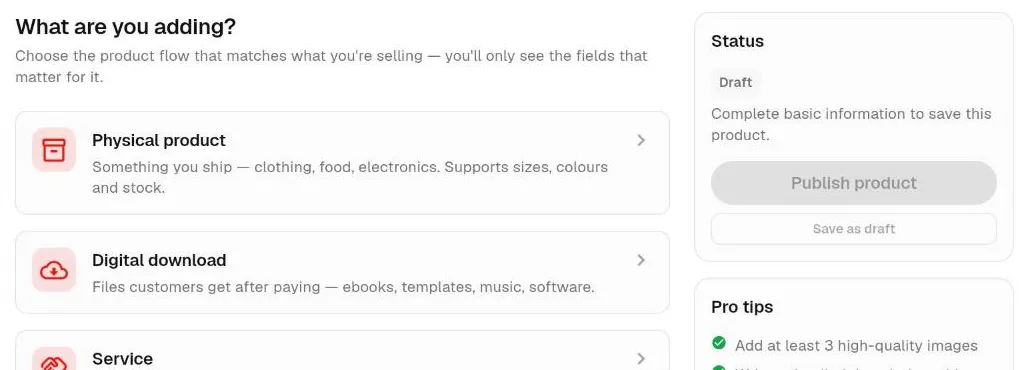
Open Products from the SELL menu and start a new product. Webift first asks "What are you adding?" so it can show only the fields you need:
- Physical product: something you ship, such as clothing, food or electronics, with support for sizes, colours and stock
- Digital download: files customers get after paying, such as ebooks, templates, music or software
- Service: something you provide rather than ship
For each product:
- Write a clear name, for example "Ankara A-line dress, size 12".
- Add at least three good photos. Natural light, a plain background and one detail shot work well. Webift's own tips suggest adding at least three high-quality images.
- Write a short description covering material, size, what is included and how long delivery takes.
- Set the price in naira.
- Add variants such as size or colour. Each option can have its own price, SKU and stock.
- Set stock and a low-stock warning so you reorder in time.
- Choose a category so customers can browse.
New products start as drafts, which customers cannot see until you publish them. Save as draft while you work, then publish when you are happy.
Step 6: Set up how you get paid
Open Settings, then Payment Settings. Under "Payment Methods" you turn on every way you want to be paid. Customers choose at checkout, and only methods that are fully set up are shown to them.
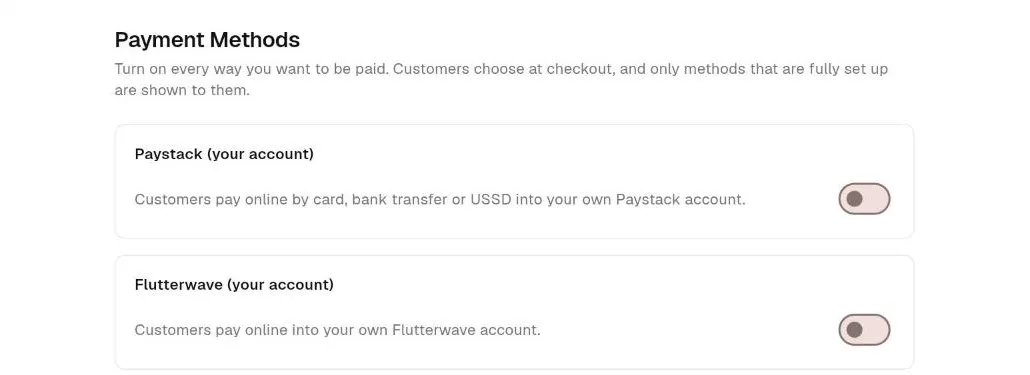
Webift offers these options:
- Paystack (your account): customers pay by card, bank transfer or USSD into your own Paystack account. You enter your Paystack public and secret keys, and add Webift's webhook address in your Paystack settings.
- Flutterwave (your account): customers pay online into your own Flutterwave account. You enter your keys and a webhook secret hash.
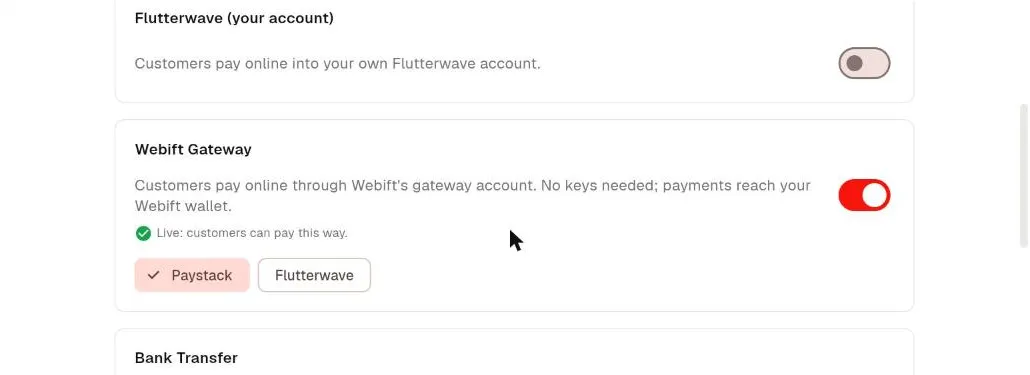
- Webift Gateway: customers pay through Webift's gateway account, no keys needed, and payments reach your Webift wallet. Availability depends on your store, so check whether it shows as live in your settings.
- Bank transfer: customers see your bank name, account name and account number and pay you directly. You confirm each payment yourself.
- Cash on delivery: offered only for carts of physical products.
Payment processing depends on the terms of each provider, and their fees apply. Paystack's published local fee was 1.5% plus ₦100 capped at ₦2,000, and Flutterwave's was 2% (checked 12 October 2026). For more detail, read our guide to accepting online payments in Nigeria.
Tip on bank transfers: never release goods on a screenshot alone. Confirm the money in your bank app first, because fake alerts are common.
Step 7: Configure delivery in Nigeria
If you sell physical products, open Settings, then Shipping. The setup wizard asks:
- How customers get orders: home delivery, customer pickup (always free) or both.
- Where you deliver: one city or LGA, one state, anywhere in Nigeria, or specific places.
- What you charge: a delivery price, plus an optional free-delivery threshold.
A Lagos fashion store might deliver within Lagos for one fee and offer pickup in Ikeja. A Port Harcourt food business might deliver within the city only. Start simple, then add zones later in the advanced delivery settings. Webift does not currently book couriers for you, so the fees are the ones you set.
Step 8: Customise and publish your storefront
Open Settings, then Storefront Appearance to add your logo, banner and a short description. Then open Store Publishing. It lists what is required before publishing and what is recommended, and gives you a "Publish store" button. Your store address will look like webift.com/yourstore, and you can choose a shorter subdomain such as yourstore.webift.com.
Step 9: Test the customer experience
Before you share the link, act like a customer:
- Open your store on your phone and on a computer
- Add a product to the cart and go to checkout
- Check that delivery fees and payment options appear correctly
- If you use bank transfer or cash on delivery, place a test order, then cancel it from your Orders screen (cancelled orders return stock)
- Check the confirmation emails
Fix anything confusing before real customers see it.
Step 10: Share your store and get your first customers
Your store link works anywhere you can paste a URL:
- WhatsApp: put the link in your status, broadcast list and business profile. In Settings you can switch on a WhatsApp contact button so shoppers can message you from the storefront.
- Instagram: add the link to your bio and answer DMs with a direct product link.
- Facebook: share product links to your page and relevant groups.
If you already sell through chats, read our guide on how to sell products online in Nigeria for ways to turn followers into customers.
Common mistakes to avoid
- Launching with poor photos. Dark, blurry images cost sales.
- Vague delivery terms. Say clearly where you deliver, how much it costs and how long it takes.
- Releasing goods on unverified transfers. Always confirm in your bank app.
- Too many products too soon. A small, well-described range converts better.
- Forgetting to test checkout. One broken step can lose an order.
- Ignoring stock. Selling items you do not have damages trust.
- Not telling customers. A store nobody knows about will not sell. Announce it.
Online store launch checklist
- Account created and phone number added
- At least three products published with photos, prices and stock
- At least one payment method fully set up
- Delivery configured for the places you serve
- Logo, banner and description added
- Store published and link tested on a phone
- Test order placed and cancelled
- Link added to WhatsApp, Instagram and Facebook
Frequently asked questions
How much does it cost to create an online store in Nigeria?
It depends on the platform. Webift has a free plan with no subscription price and a Standard plan from ₦5,000 per month (checked 12 October 2026). You also pay payment-provider fees on sales. Self-built stores add costs for hosting, a domain and developers.
Do I need coding skills?
No. Platforms like Webift let you add products, set payments and publish a store through a dashboard.
Can I sell digital products too?
Yes. Webift supports digital downloads, with files delivered by email after the order is confirmed. See how to sell digital products in Nigeria.
Do I need a registered business?
You can start as an individual seller on many platforms, but a payment provider may ask for documents to activate your account. Check your provider's requirements.
Can I use my own domain?
Webift stores have a Webift address to start with. Check the Domains section of your dashboard for current options.
How long does it take?
With products and photos ready, a basic store can be live in a day.
Final thoughts
An online store replaces scattered chats and notebooks with one place to show products, take orders and record payments. Start small, test it as a customer and improve as you learn. When you are ready, start selling with Webift.